New Feature: Review Mode We're excited to introduce Review Mode, a new feature designed to make KYC reviews faster, easier, and more transparent.
When households complete a KYC update, it can be difficult to determine exactly what changed, especially when corporations, trusts, or multiple signatories are involved. Review Mode gives advisors, operations teams, and compliance staff a clear view of every update made throughout the workflow.
With Review Mode, teams can quickly identify what changed, when it changed, and who made the change, all without manually comparing records or searching through audit logs.
VIDEO
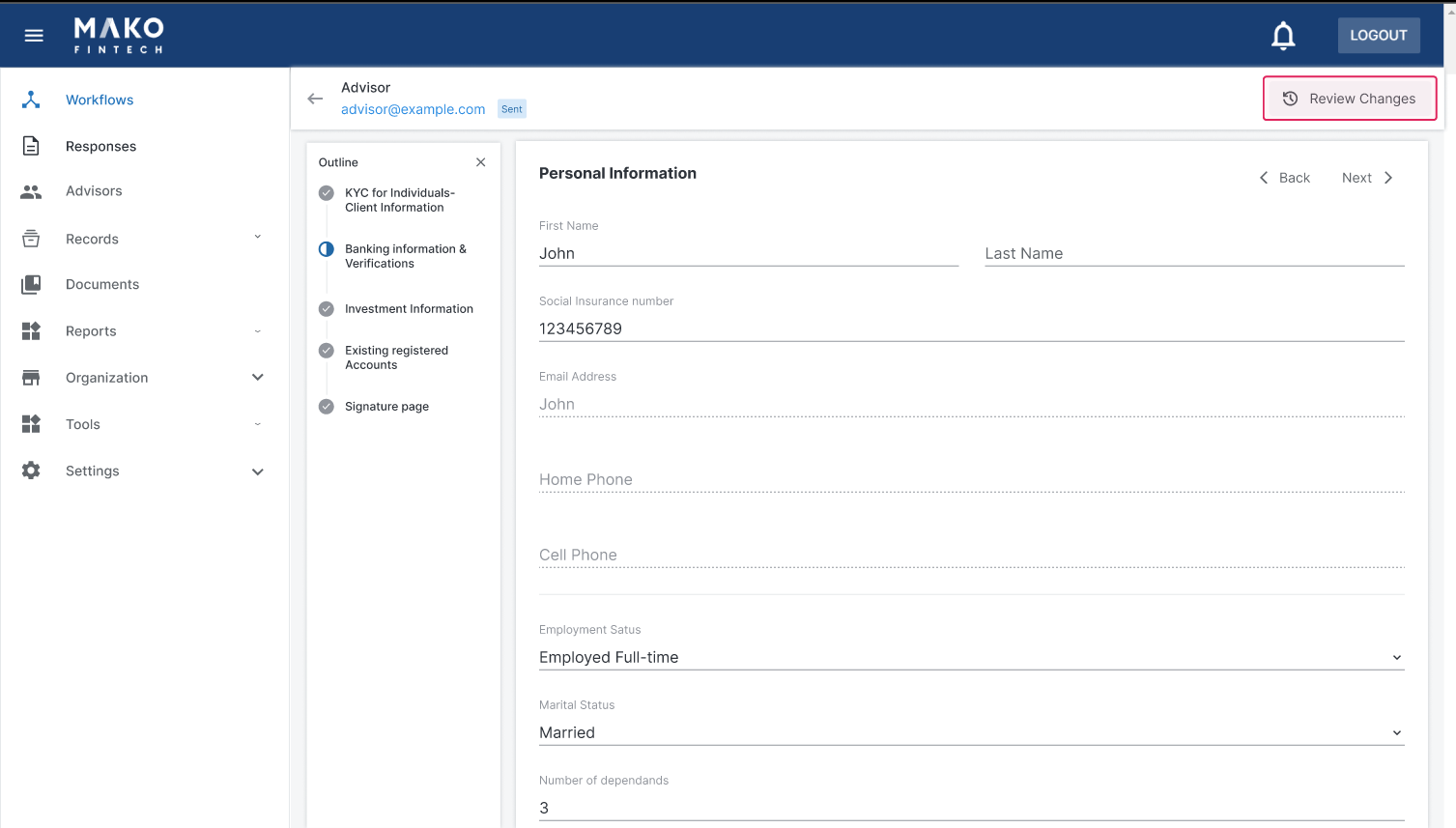
Here's How Review Mode Works Instantly see what changed When reviewing a completed workflow, users can open Review Mode to view the most recent update for each field in a dedicated side panel.
This makes it easy to identify changes at a glance and focus attention on the information that was updated.
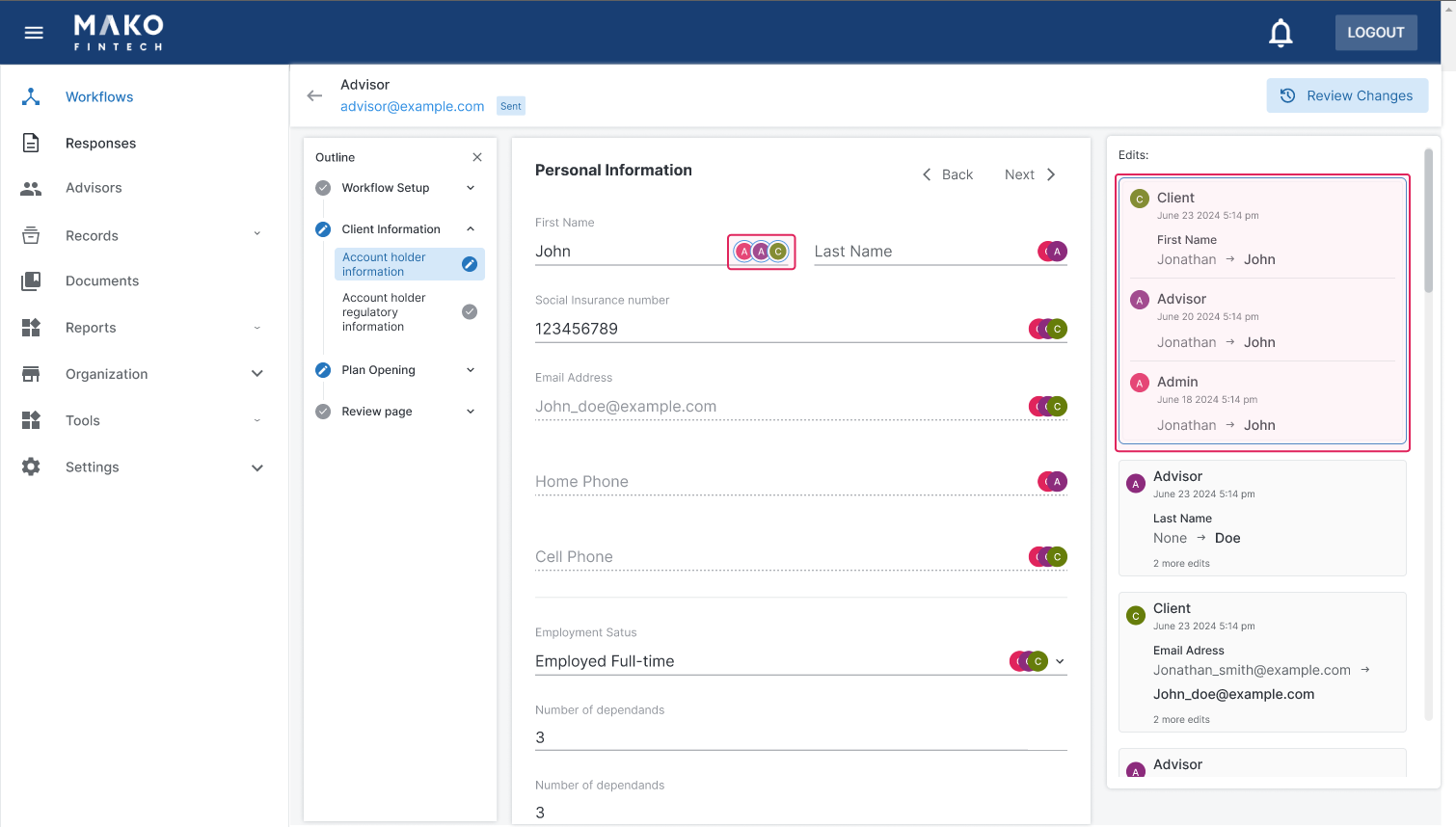
View the complete history of any field Need more detail? Simply select any field to view its full change history.
Review Mode provides complete visibility into previous values, updated values, and when each change occurred, giving teams confidence in the accuracy of the information being reviewed.
Filter changes by participant For workflows involving multiple signatories, Review Mode allows users to filter changes by participant.
This makes it easy to focus on updates made by a specific household member, corporate representative, trustee, or other workflow participant.
Strengthen compliance oversight Review Mode is backed by Mako's complete audit trail, providing a clear and defensible record of every change made throughout the workflow.
By making updates easier to review and verify, firms can streamline compliance processes, improve internal oversight, and simplify external audits.
A Better Review Experience Instead of manually comparing records or searching through completed forms, Review Mode gives teams a centralized view of every update made during the KYC process.
The result is faster reviews, greater transparency, and increased confidence that client information is accurate and up to date.
So in my view an appropriately diversified portfolio should have enough exposure to different asset classes, that its able to withstand a wide range of market disruptions. Usually, it’s some kind of negative or positive event… they’ll affect different asset classes differently. So by having your eggs in different baskets you’ll be well insulated from major risk. For example, there’s some kind of change in the housing market… both by having some exposure to it, you won’t miss out on the opportunity to make money. But if it’s something negative, you’re also not going to lose all your money if all of it were in the housing market for example. So at a high level, a properly diversified portfolio should grow in a growing market and yet not be at risk of major losses in a declining market.CN: Let’s just take a step back - what does a typical portfolio look like and has that changed over time?RB: Yeah, so I'm not entirely sure what a typical portfolio looks like these days because it's actually changed quite a lot over time. I think common wisdom used to be that the classic balanced portfolio was 60% public stocks and 40% bonds. These days that's ancient history. Most would say that the bond allocation should be a lot lower these days in this age of unprecedented low-interest rates. These days it’s the stock portfolio that’s been driving a lot of the growth. I think a well-diversified portfolio in the modern era should absolutely include exposure to all kinds of alternative assets (that aren't even really that alternative but still kind of fall out of that traditional bucket). So you know I mentioned real estate, private companies, maybe for example commodities or other types of investments. So I think that there are a lot of things that you can invest in and your advisor can guide you on what’s appropriate for you.CN: Yeah that makes a lot of sense. Talking about alternative investments, we’ve heard a lot this year about ESGs, impact investing, alternative investments… do you think there’s more of an appetite today for these types of investments than in the last ten years?RB: Yeah that’s a topic that’s close to my heart having previously started an impact investment company. It’s definitely been a gigantic increase in interest. I think when I started my previous company we were speaking to large wealth managers and having them say “we’re barely getting a grip on early ideas.” Like not including gun manufacturers or tobacco companies, and now these same companies are launching impact portfolios and marketing this aggressively. So there’s definitely been a seat change, it’s a real industry, and there’s a lot of studies out there and data showing that ESG or impact investing can equal or outperform non-impact investments. So I think it’s a huge part of the market these days. That said, one of the things that’s driving it is people’s interest in it. I think that one of the stories of the investment industry has been the personalization of it. People’s portfolios are being tailored to their own needs and circumstances. Impact investing is definitely a piece of that. People are environmentalists, but an institution is not an environmentalist. It doesn’t live and breathe the impact on the environment the way an individual does. The person who is active in the David Suzuki Foundation for example is going to be active as an impact investor and it’s appropriate for them to be.
How to Get Started Using Review Mode is simple:
Open a completed workflow response. Select Review Changes. Review the latest updates in the side panel. Click any field to view its complete change history. Filter by participant when reviewing workflows with multiple signatories. View the complete Help Centre article on Review Mode here: https://makofintech.com/help-centre-articles/reviewing-changes-in-a-response
That’s a great question. I think there's a lot of advantages and you gain a lot with an automated platform. For me, it's a lot easier to manage. I have some of my money in one of these platforms and I barely think about it. It's being rebalanced all the time. The costs are much lower in terms of expense ratio for the same kind of rebalancing. Again you're missing a lot with that, but on just the mechanical portfolio rebalancing you're getting a great deal there. I would say that two other advantages are up-to-the-minute reporting, so you always have that login where you can see your position, see how your portfolio is doing historically. And finally, this is an advantage for me and anyone who doesn't love doing taxes, but typically they’ll take care of your tax forms for you, and end up with much simpler tax forms, so it kind of works out what your cost basis was and how much you have to report.CN: So let's talk about the other side of the coin then...what are the risks of not having a seasoned professional managing your money?RB: I wouldn’t exactly phrase the question that way. You know it's more what’s the benefits of having a real wealth manager? Some of the clients of robo advisory firms may not even be aware that they're missing out. A wealth manager isn't just balancing your stocks and bonds, that's kind of the very lowest mechanical level of what you get out of the wealth manager. Really they're your advisor on your life. Intimately intertwined with you because you're thinking about retirement planning, on planning for college for your kids, when is the right time to buy a house, and when should you get life insurance, for example. An advisor can help you with all of those decisions and they can connect you with service providers like a mortgage broker when you may be in need of one. So I think that you get a lot of value out of having one of these advisers, particularly when you get to a stage in life when these kinds of services are more about the long-term and your life circumstances are far more critical. CN: There are clearly pros and cons and two sides of the story depending on who you're asking. Like you said, what stage of their life they’re in ...but do you think the platforms that we’re seeing emerging like to Qtrade, Wealthsimple, and all the rest will ever become status quo? RB: Yeah, I do actually. I think that similarly to how you know we’re using online platforms to automate everything for us (I can’t think of the last time I used to travel for example), everything you’re going to be trying to do with your money is going to be automated, and it’s going to be appropriate to be handled by one of these one of these platforms. In particular, for most people at an early stage in their lives that have few assets to manage, not a lot of complexity, not a very extended personal family circumstance, it’s gonna make a lot of sense to have a low fee robo worry about it. But at some point their life circumstances are going to get more complex and you’re gonna get married, or maybe you’re not, or you may have other objectives that you may want some advice on and at that point it may make sense to either supplement the robo advisory portion of your portfolio, or graduate to a more holistic wealth management view.CN: Thank you so much Raph, these answers were great. It’s always insightful chatting with you so thanks for sharing those answers with us today.RB: It’s my pleasure.